
As promised from last weeks post on Youtube, I promised to share the “how to” on the creation of the little teaser video for transitioning from a black and white photo to color. For those that don’t remember, the video is here: Continue reading “Creating the color video”
Tag: tutorial
Aspect Ratio adjustments explained
I can’t tell you the number of times I’ve gone to print pictures I’ve taken only to find that I had composed it in a way that a portion of the image was lost when printed because it had to be cropped out to fit on the paper. Today I am going to share a technique in Photoshop that will help you get around that pesky limitation.
First a little background – the reason why we are losing part of the picture is because we are changing the aspect ratio. What is aspect ratio? Simply enough, it’s the relative size of the long side of the picture to the short side. Aspect ratios are often referred to by their lowest common factor. So, a 4×6 print uses a 3:2 aspect ratio. (Aspect ratios usually are stated with the larger of the numbers coming first…) An 8×10 has an aspect ratio of 5:4. Want to print a 16×20? Guess what – it’s got an aspect ratio of 5:4 too! Here are some of the most common aspect ratios that you see in photography:
4:3 – Point and Shoot Cameras
3:2 – 35mm Film cameras and most APS-C sensor cameras (SLR’s)
1.81:1 – APS-H Mode (High Def)
3:1 – APS-P (Panoramic)
So, with an SLR camera, since your sensor approximates an aspect ratio of 3:2, getting an 8×10 print means you need to keep your subject matter in from the edges because when you crop to the new ratio, at least one of those edges (and a little of the other) will be lost from the crop. So, having now explained “why”, let’s now look at the “how” (as in how to fix it!) in the delayed tutorial for the week:
Creating a Monthly Desktop Calendar
I alluded to it yesterday, and have already had several people inquire about the procedure to create this desktop calendar. It’s really quite clever, and kudos go out to Jeffrey Friedl over on his site for the script: http://regex.info/blog/photo-tech/calendar He does a decent job at the basic explanation, but since we are a visual world, here are some step-by-step instructions on how to run things from beginning to end! Fair warning – this does require Photoshop as the script (I don’t believe anyway) will run in Lightroom because it uses layers…
1. Download the script from the link above (I downloaded to my desktop on Windows XP)
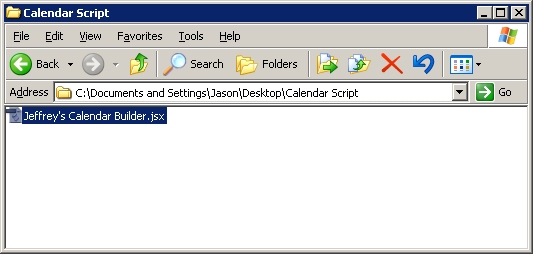
2. Copy the script from your desktop (or whatever download location you configured for your browser) to your Photoshop folder, as indicated in the screen shot.
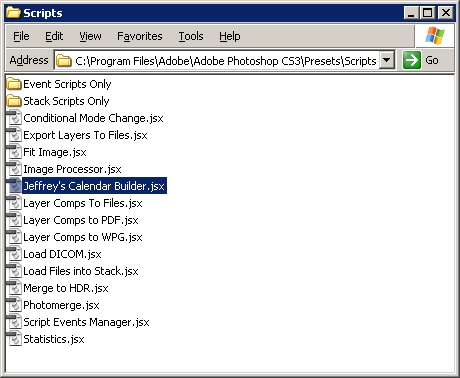
3. Open Photoshop (if it was already open, you should probably close PS and restart it)
4. Open the picture you want to apply the script to (I started with the largest size desktop I wanted to configure it for, in this case 1600 x 1200.
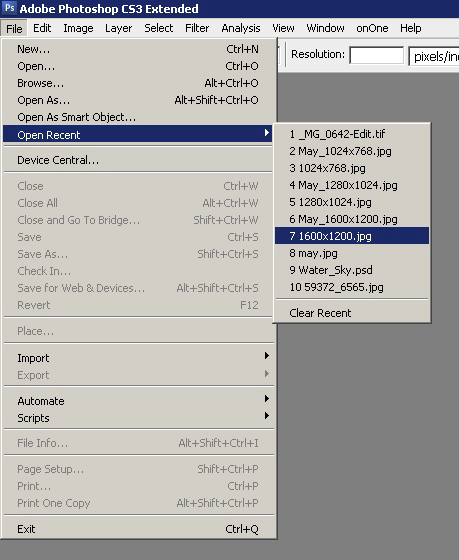
5. Navigate to the Presets option in Photoshop and open the script
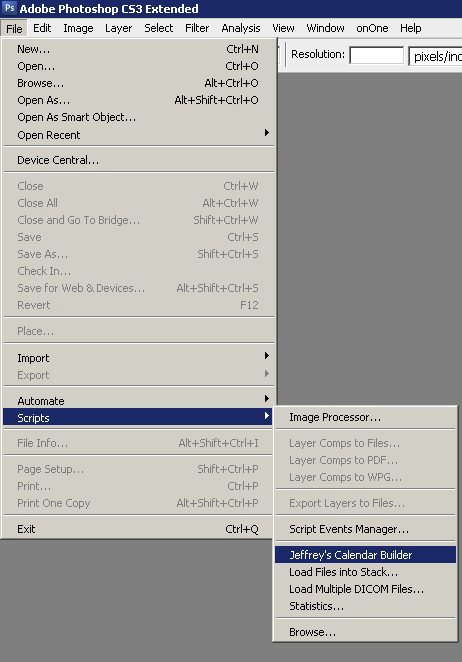
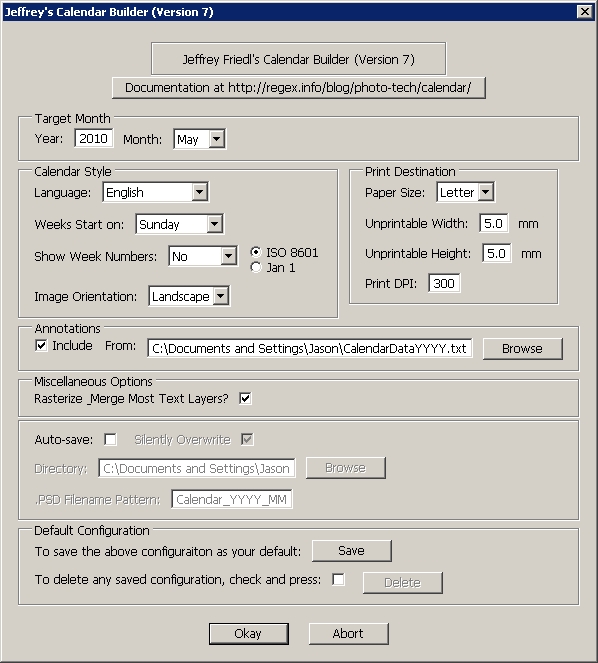
6. The interface lets you select certain information such as the month it will run for, when the week starts, etc.
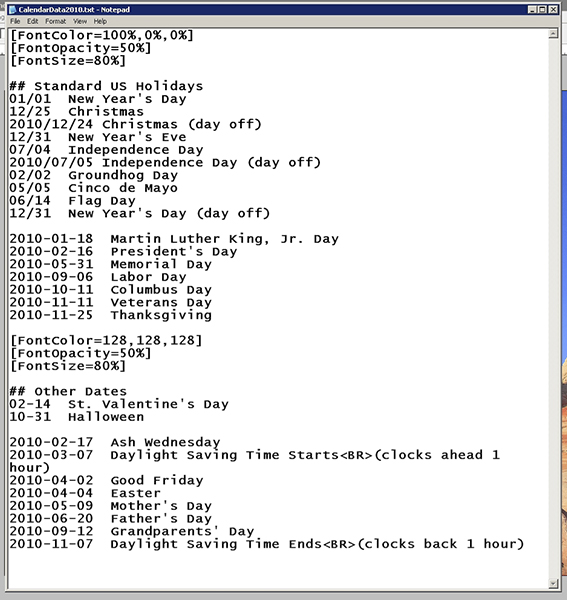
7. Special mention here to include certain holidays – if you have custom days (say birthdays, anniversaries, etc) to add, create a text file for reference and point the script to that txt file location. If you don’t want certain days highlighted,you can leave this option un-checked and proceed with the script.
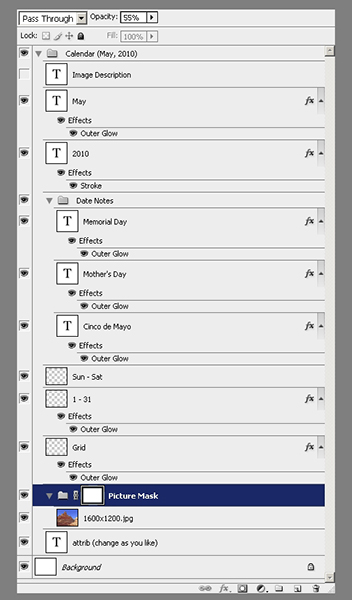
8. It may take the script some time to run (it took me about 58-61 seconds to run it on my computer, but I was multitasking with other things at the time…). When it’d done, you’ll get a stack of a lot of layers that looks like this, with the default layer selected of “Picture Mask”. Note: I’d also recommend checking the option to rasterize most text layers otherwise you’ll have up to 30 additional layers of text (one for each day of the month)! The layers underneath this are where all the really cool stuff is, and the other layers are dates and effects that you can change to suit your own tastes.
9. Once you have tailored the layers to suit your needs, simply flatten, save as a jpg and configure your desktop to use that image! Since I typically will save to multiple desktop dimensions, I start with the original and re-size to each output, from largest to smallest saving each as a jpg then letting the script use that to create the desktop calendar.
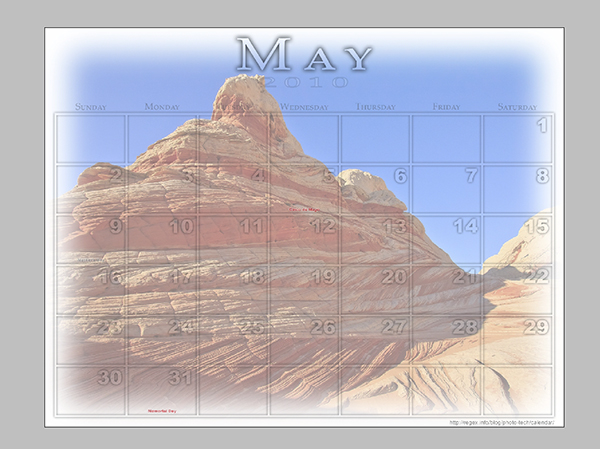
There you have it! The nitty gritty details on how to create a really slick looking desktop calendar for you and your clients. Simply print as pictures through your favorite venue if you like and watch the sales come in!
One final little news note that is time sensitive – DIY Photography has a very creative approach to contests and the prize package is worthy of a nod (don’t know how he/she/they managed to come up with this big bag of goodies!), so stop over here and throw your hats in the ring: http://bit.ly/aRQa9l
See you back here tomorrow for the latest in photo goodness! I’ll also bring up a couple tips on how to tweak the layers to your own ends, but feel free to begin exploring your own creative approaches! 🙂
Borders and Logos, it's Photoshop, Oh My!
That’s right, we’re back to a photoshop tip again on the blog, and this one comes courtesy of question I read in the NAPP community forums. The person there had asked about pricing on some photography for a large company’s set of employee photos and his concern was about the post production time in creating the border and logo that the company wanted on each.
The community quickly sprung to action, pointing him in several directions, and it occurred to me that I had never done this sort of tutorial before! It’s not too difficult but there are some pitfalls to be aware of when dealing with borders and logos in photos, especially if you are trying to program these steps into an action or script. Suffice to say, I figured this was as good a time as any to jump back into Photoshop and keep the digits (and brain) fresh! So, here’s a new video tutorial on creating borders and logos! Enjoy!
Your thoughts and feedback are welcome and encouraged as always! Thanks for stopping in, have a great week, and be sure to stop back in tomorrow for more photo goodness! Oh yeah, and don’t forget the March contest is in full swing where the winner will go home with one of these super cool Cheetah Quickstands – the theme is wild and the link for submissions is here! Happy shooting and we’ll see you tomorrow!
[display_podcast]
A video short on HDR and bracketing
One of the more popular posts here on the blog has been two that consisted of explanations on how to bracket multiple exposures in camera in order to capture a wider range of exposure values than is typically permitted in a single frame. Typically, these various exposures are then seamed together in some editor like Photoshop, Photomatix or other that is available to produce an effect called HDR – high dynamic range. You can get some impressive results with various techniques that appeal to different subjective perspectives.
Here at the blog though, rather than take sides on such post processing methods, it’s more fun to show people how to do things, and then let you all take your own liberties either with the approach or with your processing afterward, or both to get results that appeal to you! With that in mind, the feedback I’ve received from the previous discussions included a large number of people that asked for visuals of the process (I guess they are all visual learners).
Well, rather than take several dozens of images showing all the various settings and then explaining how I got toeach, a video seemed a more appropriate approach. So, here’s the video short for those of you that requested visual aids. It’s not the most professional but you should be able to get the gist.
This would also be a good time to remind everyone that we are in the dwindling days of the Adobe Lightroom contest. You can win your own free copy of Adobe Photoshop Lightroom, courtesy of the folks at Adobe, simply by entering images you’ve taken in May over at the LDP Flickr thread. Limit two images per person, but there’s still room for many more entries (no limit on the number of PEOPLE that can participate!) just join the group for free and post your images. Good luck to all and may the best photo win! (Final results will be posted in June – I’l send my top ten picks back to Tom Hogarty for final judging when he’ll pick the winner!)
That’s it for today – I should have the podcast up tomorrow, but as always, no promises as my schedule has been fluctuating at work lately. Happy shooting, and I will be back with more news, information, insights, tips and tricks tomorrow, whether in written or audio form. Thanks for tuning in and we’ll see you back here again tomorrow!
What do Photo walks and software cycles have in common?
Tune in to this week’s episode of the Canon Blogger Podcast Series, Episode #58, from either the blog or your feed readers today! I also tackle a few listener questions, and offer up a photo road tip for the listening audience. So, pick up the feed today, or stop in to the blog to not only download the show, but also to see the other content that isn’t in the daily feeds (things like the Online Photography Test, Colors and Textures Galleries, polls and more!
As I tinker a little with the audio quality of the show and try to make things more seamless and enjoyable, you’ll notice I am pushing the show out in segments, with some music to break things up in little snips between the subject material. If you like it, chime in via the comments section of the blog. If you don’t like it, well…chime in via the comments section of the blog. If you are ambivalent, well…chime in via the comments in the blog.
Hmmm…seems like someone would like to hear what the listening audience thinks of the changes in the format for the audio podcast. And it also seems that the feedback can easily be done via: the comments section of the blog!
If you’ve listened to the show and are still yearning for more, please stop by fellow podcasters Scott Sherman and Michael Stein’s new podcast series: Digital Photography Life. Formerly, these guys hosted the Digital Photography Show on another network and they’ve since moved on. Their first show on the new network mis up and ready for your listening pleasure, so do stop over and give it a listen – great to have them back on the air! Their podcast can be found here: Digital Photography Life
Podcast: Play in new window | Download
Eureka! Tutorial Tuesdays Triumphant Return!
For those that have been visiting the blog, you know that Podpress, my plugin of choice for putting out podcasts has been broken for some time as the developer has not released an update that makes it compatible with WordPress 2.6 Well, since it has been several months now, I am officially parting ways with it as my method for publishing.
Thanks to the folks over at Blubrry, I have been successfully able to implement a new alternative to embed podcasts into the native feed that already exists for CanonBlogger. So, in the interests of getting the content posted to iTunes and to those feeds that had not been updated from web references, I am going to spend the next few days providing some video content updates. The expanding ease of the .mov format not only in this interface, but also for portability purposes also seems to suggest that I am going to stick to that format exclusively for the foreseeable future.
For those that had been coming to the blog for their content, you will already have seen this video, but for those who have been waiting on the feed for new multimedia, this will be new material. Today, I am re-publishing the tutorial on reducing noise in your images. Enjoy! For the rest of you, see if you can tell the differences between some clouds shot with and without a circular polarizer. Share your thoughts in the comments on which one is with and which is without.
Image A:

Image B:

Just under the wire…
 enver did mighty fine yesterday in their handling of the Raiders, so hats off to them for getting the season started on the right note. Go Broncos!
As you may have guessed from yesterday’s post, today is Tutorial Tuesday, and since time is ticking away from me here, I’ll get right to it. The tutorial today does a comparison of reducing noise from the built in settings inside Photoshop versus a third party plugin. Granted, I went through it pretty quick and didn’t go into a lot of detail on the various settings, but I did want to give you the upshot of applying the different types of nosie reduction, so you can see how superior a 3rd party plugin is to pretty much any native reduction method.
The plugin I am using is for Noise Ninja, but I am sure that the others mentioned in yesterdays comments (thanks go out to Michael Palmer, Jen Rinaldi, and Brian Reyman for their contributions) perform equally well. So…without further ado:
Noise Reduction Tutorial (Web based)
Noise Reduction Tutorial (Quicktime)
So, that’s it for today. Tune in tomorrow for the latest edition of What’s This? Until then, happy shooting and watch those apertures!
Oh yeah, one final thing – for those picking up the blog in their feed readers: Is this podcasting plugin that I am using working? (I am trying a switch from Podpress to Podcasting on the blog, and am curious how the feed crawlers and readers will pick this up). Don’t forget too, the poll on the right hand panel has another few days left, so be sure to chime in and share your thoughts on casual shooting trends.


Podcast: Play in new window | Download
Feedback and More Fodder
First off, I’d like to thank everyone who has been taking the time to share their thoughts and feedback both in the comments and via email – it’s always fun to get the insights of others. A few people had mentioned some loose threads though that I’d not tugged on in a while, so I thought I’d give an update as to the activities and status of those projects. (As an aside, I am probably becoming famous for starting projects and never finishing them – I do eventually, it’s just that I keep adding more projects so the others start to fade as new ones come into focus.)
1st – The How-to’s of Website design: I did take a leave of absence on this primarily because there is an area that I am not as fluent on that I was hoping to find some help in the form of a second contributing author, and that has not come to fruition yet. So, if anyone is interested in co-authoring a book on the subject, feel free to let me know!
2nd – The Online Photography Test: The Basic test is complete, and the Advanced test is about 90% complete. I’d like to get some ideas and more feedback before taking that phase to completion, so again, if anyone has some suggestions on good questions for an advanced online photography test, I am all virtual ears! As for the Expert Test – I am nowhere near getting ready to even put that one out there. I am of the old school variety in that I don’t think it’s right for someone to pose a question for others to answer if they cannot provide some basis of an answer themselves. (The idea is that how can one teach or offer knowledge if one does not have that knowledge themselves.) Although higher education and high schools are rife with examples of this – I, in good conscience, cannot pretend to be an expert when I have so much more to learn on the subject of photography.
3rd – The Weekly “What’s This?” series saw an abrupt halt a few weeks ago, and I never came forth with the answer. The last shot was this:
What’s This?
And the answer is: the grill from the front of our microwave. Unfortunately, we are no longer in the house, so I can’t capture a full version of the appliance to show you a zoomed out perspective. But anyway, thanks for those that waited patiently to discover the answer. I should have a new “What’s This?” back up and running tomorrow.
Finally, as I endeavor to get back into a steady routine of tutorials and regular writings, I have a video tutorial put together for this week. Since I did get a few questions from people who asked if I could show the method for achieving a panorama rather than just writing the methodology out, here is the “outtro” for how to post process a series into panoramas. Since the podpress plugin is still misbehaving, I’ tried an alternative means for feeding things for the time being, but that doesn’t seem to work either. So, I am going to have to go another week with a link to both the Flash and the Quicktime! Sorry again for the continued inconvenience.
I’m not adjusting the iTunes feed just yet as I have confidence that the podpress developer will have an update coming sooner rather than later, but if people wish to add the secondary feed to their readers, that will be in play until the original feed comes back online. I am posting it to the podpress feed link too though as a test to see if it comes back online, so if you subscribe to the original feed and it shows up, let me know. Otherwise, continue to visit the blog (which is preferable anyway) to catch the flash version. Hope you all enjoy it!
I’ll be back tomorrow with a Wednesday Walk around the Web, and a new installment of “What’s This?”! Until then, happy shooting, and watch those apertures!
Tuesday Two Minute Tip

That’s right, I’ve finally gotten back in the saddle for some good old fashioned Photoshop fun. Today, it’s a quickie, but then again, that’s how we like our information on the web: short, sweet, and to the point. Today I give a little tip on how you can use the Clouds filter in Photoshop. This technique works in pretty much any of the last 3 iterations of the software (I am assuming it works in CS – I got into the game in CS2 worlds…).
Anyway, take a gander on the download feed listed at the end of the post. The result of the tip is actually at the top of the post so you kind of get a little teaser there! (Yes, I am a tease!) Not much else today, as I am still swimming in a sea of boxes. I’m hopefully a little ahead of the game now for video tips and tricks, as next weeks is set to auto publish Tuesday morning.
I do have my “Shoot the Day” pics for Photoshelter, and will hopefully have those processed (at least a quick process in DPP) and ready to share tomorrow, so stop on back to check those out. In the final news tidbit – don’t forget the Photo Contest here at CB. Stop over and share some pics along the lines of a “Freedom” theme, and you could win a $25 gift card to B&H! 2nd place and 3rd place prizes will be awarded too!
So, until next time, happy shooting and we’ll see you back here tomorrow!
Wed Edit: The linked video is not displaying for some reason so for the time being, it can be downloaded directly here
CB Episode #48: Clouds Filter
[display_podcast]
Podcast: Play in new window | Download