Category Archives: Lightroom
Lightroom 3 FAQ
With the release of Lightroom 3 the other day from the folks over at Adobe – I’ve had an influx of several repeating questions. While I’ve replied to (hopefully) everybody, it’s useful to note those questions and the responses here as well for my first ever: Adobe Photoshop Lightroom 3 Frequently Asked Questions 1. I tried the tethered capture, but Lightroom does not appear to let me adjust shutter speed, aperture or ISO with my (fill in your camera body type). Is this model not supported? Answer: The tethered capture is only intended as a capture function. The display shows … Continue reading
Five Tips to Better Photos
With the sudden surge and swell in the blogosphere, Twittersphere and Photosphere over Lightroom 3 hitting the streets (and a nice combo discount is available in the sidebar by the way), let’s not forget that this software is all meant to be doing one thing – letting us get back to the business of taking photos instead of spending our time in our computer. With that in mind, I’m bringing back a popular concept of “Top Tips”. Today, I give you…(drum roll please): “Five Tips to Better Photos” Be Ware of Exposure Values – No matter how good your camera … Continue reading
Lightroom 3 Q&A (Beta)
What a great day to release a new podcast – with the final release of LR coming out very soon, I had the distinct opportunity to talk with Rob Sylvan, author of LR2 for Dummies, and the forthcoming Taking Stock. We talked a lot about Lightroom, working at NAPP, and took a few listener questions and answers. More photo news, additional Q&A, and a new feed for the podcast start today, so be sure to download the latest show. You’ll notice I have pulled the feed back to this site, and the format is more iTunes compatible (m4a) so you … Continue reading
Ammo in the armaments
Last night the DALPUG (Denver Area Lightroom Users Group) had their bi-monthly meeting and host Brian Reyman walked us through some of the features of the Lightroom 3 Beta. It was a gret seminar and offered an opportunity for many to get an idea of what to expect. I had not realized that there are many work flow options out there because when queried, the audience responded with quite the variety of software approaches. We didn’t officially count votes, but it seemed roughly along these lines: 40% Lightroom 2 40% Photoshop CS (no query here on version #) 10% Aperture … Continue reading
Photoshop Teaser…
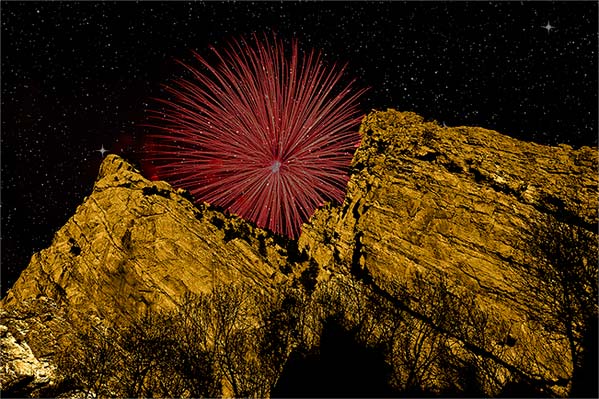
The Denver Area Lightroom Users Group (DALPUG) had their bi-monthly meeting tonight, and it was a lot of fun. Brian Reyman (the leader) gave some great insights on digital asset management and some really cool Lightroom and Photoshop tips and tricks. He reminded me that it’s been a while since I’ve played in Photoshop, or done tutorials here on the blog for that matter. So, in the interests of putting some sort of creative graphic design effect together, I started playing around in Photoshop when I got home with a few different tools, effects, and all that fun stuff. When … Continue reading
Flickr Plugin for Lightroom
While recently participating in a Photowalk group outing to Rocky Mountain National Park, with the fellow local photogs, I learned about this great little plugin for Lightroom that allows you to export your photos directly to Flickr…all within Lightroom! It’s a pretty cool little plugin, and as you know, when I learn something new – so do you! This plugin comes courtesy of Jeffrey Friedl, and one of the greatest features of it is the cost – absolutely free! Well, that’s not exactly true, you do need to spend one cent via Paypal, but for a penny, check out what … Continue reading
DALPUG
No, this isn’t spam, the blog has not been hacked, and I am not speaking in tongues here. DALPUG refers to the Denver Adobe Lightroom & Photoshop Users Group. Started relatively recently by a guy I know named Brian Reyman, it’s a great local resource for photographers to not only learn from one another, but also to network and get an opportunity to see some of the latest developments in the industry. I had a chance to attend the meeting last night, and the mini-workshop that Brian ran on plugins included quick looks at things like OnOne Software, Topaz Labs, … Continue reading
A Look Ahead…
Just a few news nuggets today of some things that have been going on and simmering on the proverbial stove for the past few weeks. Many of these are now starting to bubble up to the surface, so here’s a little hint as to what I’ve been up to, and what is ahead for the blog and podcast…
Cabo Creativity
Last week’s first ever 5-day series of written work “The Five Elements of Control” featured 5 distinct ways in which you can control and increase the impact of your work. Those elements were through controlling for luminance, color, geometry, context, and composition. Hopefully, the perspective can be one many will find useful in elevating their own work. In taking the task to heart, today (my first day back after a week-long break in beautiful Cabo San Lucas), I am sharing a slideshow of some of my favorite recent shots. So, rather than suggesting others incorporate these techniques, I am trying … Continue reading
Teaching to Learn…
For those of you that don’t know – there is a cool little feature available for iPhone and iPod Touch users called AudioBoo, where you can record up to three minutes of audio soundbites and share online. It’s a pretty neat little feature, and allows for short bursts of ideas. I shared just such a recording (they are called “boos”) this evening after I left the Exposure Denver photo club meeting. You can listen to the recording here or continue reading below my thoughts on the Exposure Denver experience! Speaking of which, the gang from the group was so cool … Continue reading
Creative Composition – Vignetting Photos
In general we learn that placing your subject dead center in the frame is something to avoid – creatively speaking it can kill a picture. While this holds true as a general rule, I was walking into work yesterday morning and the sky was a brilliant blue, with the capitol bulding of Denver right dead center in front of me, and I thought that might make an interesting attempt at breaking the rules if only I had my camera….and then it dawned on me, I did have a camera. Granted, not my trusty 40D, but the smaller Powershot As500 IS. … Continue reading
Wacom Bamboo Fun: Hardware Review
The good folks at Wacom were kind enough to donate a Bamboo Fun to me for review on the blog a while back. In order to really get a full handle on it though, I wanted to use it within the context of my at-home work flow. You see, I’m not a newcomer to tablets, as at work and through previous experience, I’ve grown quite accustomed to their usage. I’ve had to instruct people on how to use, configure the basics, and such on their computers. as well as used them in many of their varying sizes (most recently being … Continue reading
And the winner is…
Blooming Orchid, by photographer John Dunne, of Ireland. He’s got quite a nice portfolio of images too over on his Flickr photostream, so do stop over and give him a little kudos, pat on the back, congratulations, etc. as he’s won the Adobe Lightroom Contest here at Learning Digital Photography! His winning image (surprise surprise) is a blooming orchid, shown below: Congratulations again to John for this beautiful shot. I know I said it before but it is worth saying again that the decision was a very difficult one to make as there were so many excellent images contributed! Thanks … Continue reading
And then there were three…
First off, some software news that we all may want to stay abreast of – Adobe has released the latest updates for Camera Raw and Adobe Lightroom. The ACR update applies to CS4 users, Elements 7.0 users, and Premiere Elements 7.0 users, and includes raw conversion algorithms for the Canon 500D, the Powershot XS1 IS, the Nikon D5000 and several Hasselblads, as well as some other camera updates for Olympus, Sony, and Pentax. It’s version 5.4 and is now out of beta and available for download. The updates for Windows and Mac are available here: Camera Raw Windows Macintosh For … Continue reading
A dash of splash
First up – another web gallery of water drops – this time with a neutral black background that I developed in Lightroom. I am tellin’ ya – this product is just too cool! Photo management, editing, tagging, and gallery production all in one – what’s not to love? Also up today, a little shout out to Dave Zarzacki, who owns a like new Canon XSi in mint condition, but just doesn’t need it in his gear bag (he’s trying to round out his collection with an SLR that will take all his current lenses). It’s a great deal which includes … Continue reading
Coulda beena contenduh
Actually, all 53 of the images that were submitted to the Lightroom Giveaway I’ve been taking entries for on the blog were contenders. Truly some great images were submitted to the Flickr Thread for the giveaway I’ve been hosting for the past month. Some really great images. The rules were simple: Take any two pictures you like in May, share them on Flickr thread (& be family/work-safe) and you are eligible to win a copy of Adobe Lightroom – courtesy of the good folks over at Adobe (especially Tom Hogarty who was kind enough to make an appearance on the … Continue reading
Airtight Viewers – Web Gallery Options Reviewed
Initially, this week was supposed to be the second in a series of software review posts to take a more detailed look under the hood at Photoshop Elements as an alternative to Photoshop Creative Suite. Truth be told though, the more I poke under the hood with Adobe’s Lightroom, the more hooked I get. One of the absolute best features (in my opinion) is the web gallery options available to you in Lightroom. The options are endless! You can go from standard HTML, to Flash-based templates, and hybrids, with customizations galore. One of my favorites though, is how Adobe integrated … Continue reading
Super Sigmas, photo walks and seminars!
Lame teaser alert, but that’s the title for the podcast over at Learning Digital Photography. Make sure to stop over to the podcast and download the show today! Here’s the show notes (I may add to these as I remember link references – if any are missing, let me know in the comments so I can be sure to add them…) The last day to enter your photos for the Lightroom giveaway is super close – so get your shots in the Flickr thread here pretty soon! Adobe updated the ACR to 5.4 (still in beta), and is downloadable here … Continue reading
A video short on HDR and bracketing
One of the more popular posts here on the blog has been two that consisted of explanations on how to bracket multiple exposures in camera in order to capture a wider range of exposure values than is typically permitted in a single frame. Typically, these various exposures are then seamed together in some editor like Photoshop, Photomatix or other that is available to produce an effect called HDR – high dynamic range. You can get some impressive results with various techniques that appeal to different subjective perspectives. Here at the blog though, rather than take sides on such post processing … Continue reading
Photo walks, news, and a visit from Scott Kelby
So, as many of you know, Scott Kelby, president of the National Association of Photoshop Professionals (NAPP), Kelby Media Group, Kelby Training Live, and leader of the pack of Photoshop guys over at Photoshop User TV, was in Denver yesterday on his Adobe Photoshop Lightroom tour. He led a seminar yesterday that, despite several technical difficulties, was pretty rockin’ when it comes to establishing a work flow in Lightroom. Scott is also known for his annual worldwide photo walks that he started last year. This year response has just been enormous to the walks, with several cities (including Denver) filling … Continue reading
The 70-200L f4.0
In keeping with the last few weeks of hardware reviews, I am taking a look in my own bag one more time to bring you this weeks’ hardware review: the 70-200mm L lens from Canon. Canon has several variants on this lens, with different minimal apertures both with and without Image Stabilization (IS). So, in the interests of full disclosure, this is a non-IS lens, and the aperture range is the standard one, 4.0 to 5.6. So, with that distinction being made, we’re off and running: The “L” distinction is one that bears discussion right off – Canon only gives … Continue reading
Photo Contest – Win Adobe Lightroom
Happy Saturday all. It’s a rare weekend post here – since Friday was silent. Two things – first off, Happy Mothers Day to all the mothers out there! Second, as the podcast on Tuesday announced, don’t forget the first ever Learning Digital Photography Contest is under way – all during the month of May, submit your shots to the Flickr group (2 entries per person) for your chance to win a copy of Adobe Photoshop Lightroom 2.0! Not only is it a great chance to win this wonderful program, but a great way to get increased visibility of your work … Continue reading