
As promised from last weeks post on Youtube, I promised to share the “how to” on the creation of the little teaser video for transitioning from a black and white photo to color. For those that don’t remember, the video is here: Continue reading “Creating the color video”
Category: Adobe
Photo Technique of the Week
Yeah, okay, I don’t do this a lot, but every once and a while it’s fun to put together a quick technique or tip to share with the reading/listening community, so here’s one that’s very helpful when using Lightroom. More of a tip than a technique, this is simply a suggestion to enable the Auto Advance feature. When you check this feature, it makes your work flow go a lot quicker when making picks or rejects from catalogs. After I’ve completed an import, I’ll go through and tag the picks and rejects with my keyboard shortcuts (P) and (X) respectively. Because the Auto Advance feature is enabled, simply making a”tag” or flag selection on a picture, advances me to the next one in the current catalog or collection.
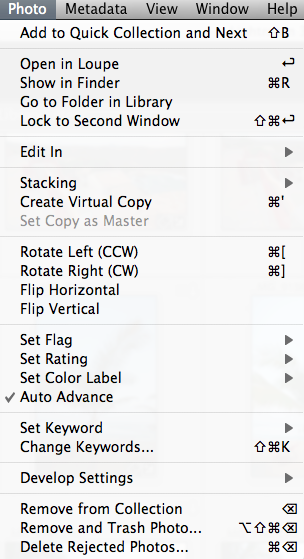
After I do this, I simply look up at the top of Lightroom while in Library mode to filter my collection for either picks or rejects. From my approach, I do the rejects first, then CMD/CTRL A to select all and delete! Then from the picks, I’ll go through and make whatever edits I need, even including round trips to Photoshop, Photomatix, or whatever 3rd party software I happen to need or be using at the time. This is always so much easier with Auto Advance enabled. I can fly through a shoot of 500+ images in about 20 minutes both to clean up the catalog, and make the picks of what will likely be in the final published album. Give it a whirl and see if it improves your work flow!
Got your own tips or tricks for Lightroom, Photoshop, or simple camera techniques? Share the love and sound off in the comments! Either that or share your own thoughts on what you think of the techniques I share here. Regardless, tips tricks and techniques like these are always designed to help you get through post production and do what we all love to do – get out and shoot some more! Happy shooting and we’ll see you back here next time!
Aspect Ratio adjustments explained
I can’t tell you the number of times I’ve gone to print pictures I’ve taken only to find that I had composed it in a way that a portion of the image was lost when printed because it had to be cropped out to fit on the paper. Today I am going to share a technique in Photoshop that will help you get around that pesky limitation.
First a little background – the reason why we are losing part of the picture is because we are changing the aspect ratio. What is aspect ratio? Simply enough, it’s the relative size of the long side of the picture to the short side. Aspect ratios are often referred to by their lowest common factor. So, a 4×6 print uses a 3:2 aspect ratio. (Aspect ratios usually are stated with the larger of the numbers coming first…) An 8×10 has an aspect ratio of 5:4. Want to print a 16×20? Guess what – it’s got an aspect ratio of 5:4 too! Here are some of the most common aspect ratios that you see in photography:
4:3 – Point and Shoot Cameras
3:2 – 35mm Film cameras and most APS-C sensor cameras (SLR’s)
1.81:1 – APS-H Mode (High Def)
3:1 – APS-P (Panoramic)
So, with an SLR camera, since your sensor approximates an aspect ratio of 3:2, getting an 8×10 print means you need to keep your subject matter in from the edges because when you crop to the new ratio, at least one of those edges (and a little of the other) will be lost from the crop. So, having now explained “why”, let’s now look at the “how” (as in how to fix it!) in the delayed tutorial for the week:
Software Subscription Models Revisited

As some die hard friends and colleagues are aware, Canon Blogger, suffered a catastrophic failure about a year or so ago now, and I’ve slowly been crawling along as I try to resurrect the archives, and get everything back online. The process has been a tedious one as with nearly ten years of content, some was lost for good when the server crashed, other content survived in the last backup that was performed. Be that as it may, I recently was reading an article on Medium about The Rise of the Rent Seeker and thought to myself, “Oh my GOSH, this nails on the head exactly what I was trying to say way back in 2011 when Adobe made the switch to the subscription model for their software licensing model. This was such a good read that I wanted to share it (thus realizing another two or three articles that were lost, but now recovered courtesy of The Wayback Machine) in the context of my original thoughts. You can read my original articles here and here.
In a nutshell, this most recent article from Medium explains that:
…the economy has two kinds of entrepreneurs: profit seekers and rent seekers, and those who participate in the latter are redistributing the wealth from the subscribers pocket to their own. Adobe has made the shift to this model, and as such, they are extracting value, but not giving any real value back….”
It goes on to elaborate about how the technical space is inherently badly suited for innovation and development when they convert to this model. But the statement made is pretty powerful:
Increasingly, mature software vendors who have run out of innovation runway turn to rent seeking, increasingly we are are told that the subscriptions will soon be everywhere and there is a real problem with that.
Toward that end, it raised the question in my mind: Does that mean Adobe has stopped innovating? What else can be added Photoshop or Photoshop Lightroom to improve our workflow? I honestly don’t know as I’ve stopped upgrading as of CS5 and LR 4. I’d love to hear others thoughts on whether or not Adobe has really been all that innovative over the past 3-4 years. It was telling though, that the author actually used Adobe in his illustration of the dangers of entering into a subscription model:
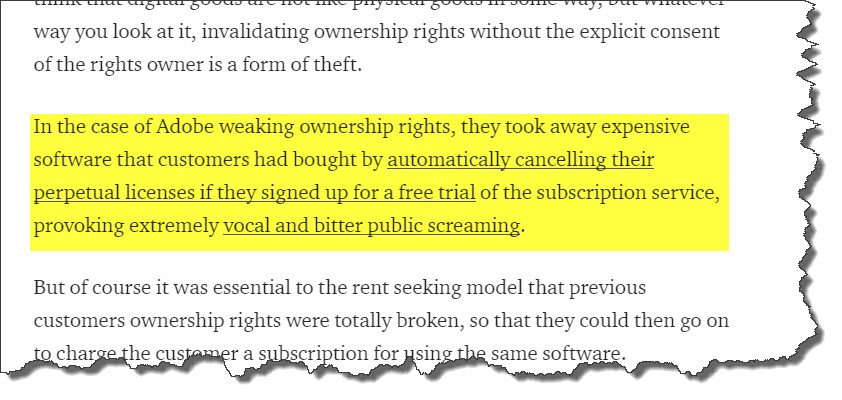
The article does give a little bit of validation to me though, in seeing someone else so much more eloquently than I as to why renting is almost always (in the long run) not in the best fiscal interest of the consumer.
From Bad to Beautiful
Making better pictures comes in three forms – better setup, better composition, and better post production. You will make your best shots if you improve in each of these areas. So, today, I’m going to share a technique I’ve used to take boring and bad photos to make them beautiful in post production. Here’s where we’re going to go:

So, the final product looks pretty good here, right? It means we must have had a keeper to begin with, right? Well, not necessarily – the first shot looked like it was under-exposed, and could easily have been thrown out. Take a look:

Yeah, it looks pretty bland – there’s no pop, the shadows are too dark, the blues in the sky are bland, and it’s something that we might just blow past as an under-exposed shot. The truth is though – we’ve gotta trust the histogram. Take a look
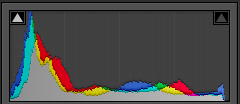
What we have to remember is that there are no blown highlight details or shadow details lost according to our histogram. We’ve got detail on both ends. What the histogram is telling us though, is that more of our photo is in shadow than in highlights. We do have some of both, but we need to bring some balance to it. So, let’s get started
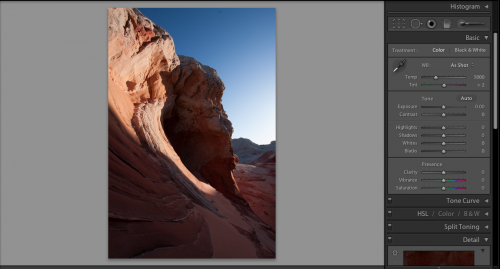
In getting started, we need to bring out the shadow detail more, but I also want to bring some of those highlights down a little too, because it just looks a little too harsh. Here’s the default scene inside of Lightroom. Let’s see what happens when we bring the highlights down – and when I say “down”, I mean way down!
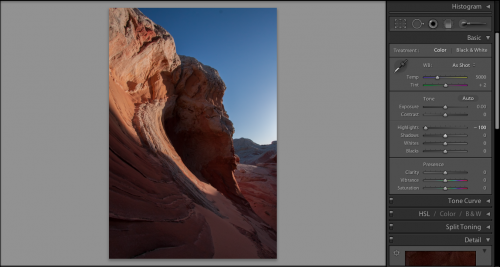
See how the harshness of the sky on the right has been pulled back? Much better, but we still need to bring out some of that shadow detail on the next step, so, let’s take a look:
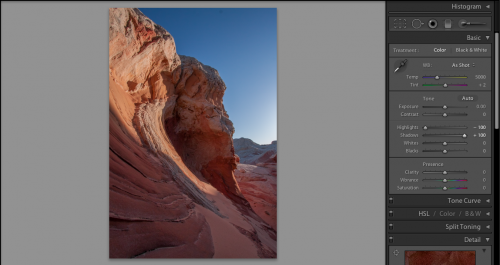
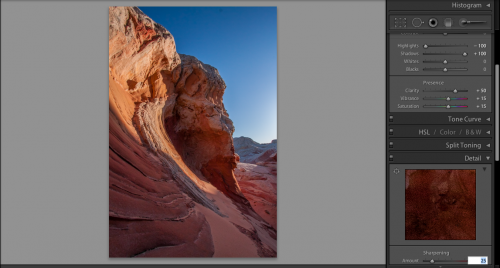
Remember, it’s just my personal tastes, but I like the settings of 50-15-15 through to really get some eye-dropping pop in my photos. It’s pretty nice, but if I push these sliders much further, it will start to look garish. This means I need to dabble a little with the tone curve to get the pop that I am looking for. So, in remembering the histogram, I am wanting a bit more detail from the dark and the bright areas need to pop a little more too without getting lighter. Here’s where I made some tone curve adjustments:
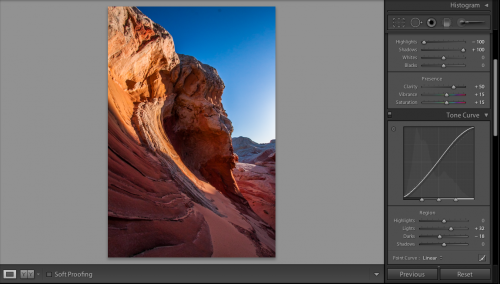
The pop is really starting to take shape here…but the red still need a little more brightness to them to really keep the look and feel consistent wit what I want the image to look like once all is said and done. To do that, I dive into the color palette, grab the red luminosity slider and crank it up all the way. The results are pretty nice!
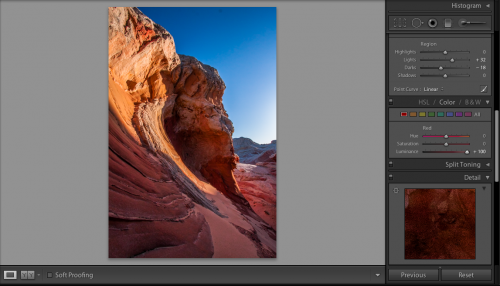
It’s at this point when I noticed a dust bunny from my lens (see near the top of the sky). So, I headed back up to the top of the Develop Module to take care of business:
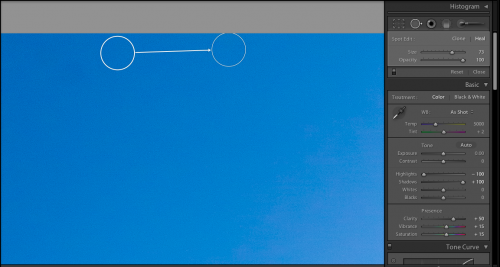
Now that I’ve fixed the dust bunny, it’s time to move onto my final step..my lens correction! No matter how good your lens is, there are imperfections, from chromatic abberations to edge distortions. The general rule of thumb is that the wider the lens, the more edge distortion there is. Since I shot this with my 10-22 which is an ultrawide, there’s some substantial distortion to fix. So, let’s take a look:
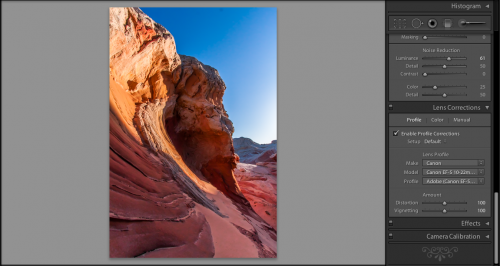
For those of you that prefer audio/video tutorials, I’ve done a short YouTube video. It’s a lot faster than the read, but some details are lost if you tend to go after minutia:
Enjoy, and we’ll see you here next time! 🙂
Adobe Acknowledgement

Whether tacit or not, Adobe seems to have listened to the concerns voiced by many in the creative community over their impending pricing and licensing policy changes. As you may recall, I ran three posts late last year, first calling attention to the new policy. Secondly, as discussed on Scott Kelby’s video podcast “The Grid“, called “Why Scott Kelby and Crew are Wrong“ Finally, I started running a poll to tally people’s thoughts on the policy shift. Scott himself ran an entire post as an Open Letter to Adobe shortly thereafter, both addressing the issue squarely, as well as offering an alternative. Apparently, Adobe was listening!
A news post came to my attention a few weeks ago, and while in the midst of the holiday fracas, I did not want to minimize both the significance and importance of this change. So, with the holidays behind us and a new year ahead, I’d like to give some kudos to Adobe for recognizing the painful effect their new policy would have on legacy customers. They’ve made a change to their plans, allowing CS3 and Cs4 customers to upgrade at a reduced pricing schedule (very much in keeping with what Scott Kelby suggested), thus easing the cost of upgrading for them. The full release is here:
Adobe Special Upgrade Announcement
For those not wishing to follow in-post links, here’s the full text of that announcement:
Upgrade offer for CS3 and CS4 customers
We’re very excited about the upcoming release of Adobe® Creative Suite® 6 software and Adobe Creative Cloud™. CS6 will be a major new release of our creative desktop tools, with huge improvements for every type of creative professional. Adobe Creative Cloud will be our most comprehensive creative solution ever, giving members access to all of the CS6 desktop software plus additional services, new tools, Adobe Touch Apps, and rich community features. In addition, Creative Cloud members will receive continuous upgrades and updates to all products and services as part of their membership.
With these great new releases coming in the first half of 2012, we want to make sure our customers have plenty of time to determine which offering is best for them. Therefore, we’re pleased to announce that we will offer special introductory upgrade pricing on Creative Suite 6 to customers who own CS3 or CS4. This offer will be available from the time CS6 is released until December 31, 2012. More details on this offer, as well as any introductory offers for existing customers to move to Creative Cloud membership, will be announced when CS6 and Creative Cloud are released later this year.
The only caveat here is that we still do not know when the CS6 suite will be released (well, some of us do…but as they say, those that don’t know guess, and those that do know – can’t say a word!). All we can ascertain from this is that CS6 is coming in the first half of the year. No surprise there, but if it is released closer to June, then that shortens the window for Cs3 and CS4 customers to take advantage of the reduced cost upgrade that Adobe is offering. Still, better to not look a gift horse in the mouth. Adobe has heard our concerns, and responded in what I think will be an appropriate manner. While we don’t know the specifics of the pricing offer, we do know that they have heard us and are giving customers an opportunity to upgrade for a limited time. So, start saving pennies now to make your eventual upgrade that much easier to swallow!
Of course, Cs5 or Cs5.5 customers will be able to upgrade at normal rates, so this announcement doesn’t really affect you – but it’s a welcome sign that companies and and do listen to their customer base! So, thanks Adobe for listening!
Why Scott Kelby and Crew are Wrong
It was brought to my attention over the weekend that Scott Kelby chimed in on the pricing and policy change that Adobe has implemented on their latest episode of “The Grid”. It’s a great vidcast that hits on the meat of topics that photographers are talking about, and this episode was no exception, helping to dispel some of the myths that surround photographers. What I want to talk about here is what they prefaced the show with: a short five minute blurb about the Adobe policy, and what’s wrong/right with it. I was dumbfounded.
Fair warning – this is a long post….much longer than what I normally post – but it’s that important! Please take the time to read this whole thing because you will have a complete and clear understanding of these odd terms like Subscription Service, In Perpetuity, and Creative Cloud. You’ll understand the differences, and see why the new pricing scheme is not a good decision for anyone – personal or professional businesses!
So, in the interests of getting it right, I went back and listened to it several times, finally writing a transcript of it (which you can read here. Here’s the nuts and bolts though of what they had to say…
[Scott] And that’s my guess. I haven’t talked to Adobe on this. Nobody in Adobe’s pricing dept. said this. I can imagine the reason why Adobe did this is a couple of things:
1. I…and this is where all the controversy is, I don’t think it’s the pricing so much, I haven’t heard anybody gripe about the price it’s like $50 a month and you get everything they do. You get everything, right? You get like the whole Master Collection. Again, I didn’t look at all the numbers, so I don’t …I could be a little off.
[Matt] It’s ballpark and if you add up what it would cost you to buy the Master Collection, it actually in some ways can save you money.
They are looking at the Creative Cloud service, not the subscription pricing. Let me state that again, unequivocally:
They are confusing the subscription model with the Creative Cloud stuff.
These are two different things, so let’s get that on the table right away. The subscription service is not $50 a month! What’s the difference? It’s easy! A subscription service is something you pay a small amount for every month (or week, or year…whatever, you are a subscriber. How is that different from the current licensing? The current licensing (whether by download or media – it doesn’t matter)…means you own that license forever. In legal terms, it’s called an in perpetuity license. You’ve bought that license and are entitled to use it forever! Renting a house (or apartment) is far more expensive than buying one. Renting (or leasing) a car – the same. Would you rent a camera? For one time uses, sure…but who wants to use that model if you plan on doing anything regularly? The answer: no one! From Adobe’s perspective (or any provider for that matter), it’s a great business model because it makes the renter more money. The same holds true here for Adobe! Don’t believe me? Take a look…
We are assuming that we are starting from an upgrade perspective – people that already own a CS5 license. The following chart is based on the cost to upgrade an in perpetuity license (assuming that doesn’t change…) and shows what that same cost would be under the subscription model based on a 24 month cycle:

An important qualifier here – Adobe is also moving to an alternating schedule whereby dot releases are put out in alternating years to full version releases:
CS5 – 2010 CS5.5 – 2011 Cs6 – 2012 CS6.5 – 2013 CS7 – 2014 etc.This is why you are renting on a 24 month schedule. It’s also why there is no way that renting anything would cost you less. They said they hadn’t had the time to look into it. Several others have. In their defense, the 5 minute bit was full of qualifications – Adobe didn’t tell us, we don’t know, we can only guess…all that sorta stuff, which is fine in and of itself. But how can someone say with a straight face that renting costs less than owning? Seriously. Take any basic business course or economics course. The pricing factor aside (which is already been demonstrated as exorbitant…) at the end of renting – you own nothing!
How is the subscription model a better model for anyone besides Adobe? Scott and crew answered with the following:
“[Matt] The biggest problem I see, there’s gonna be a barrier to entry for someone who is on Cs3 or CS4.
[Scott] Especially hobbyists
[Matt] That’s who I’m really talking about. For a company I think…it’s not just better for Adobe…to put in a subscription model because now they know how much they are gonna take in every year…but now a company knows exactly how much money you’re gonna spend each month on software. So it’s easier for a company.
Hobbyists though, ya know, it’s hard to swallow six or seven hundred dollars…
[Scott] A year…
[Matt] And then go into the subscription model too…
[Scott] Oh no no…you’ve gotta upgrade…it depends on what you have…if you have the Suite..I don’t know…
[Matt] It does get, it can get hairy…”
As you can see – it’s not that hairy – it doesn’t matter what you own: CS2-Cs5 will cost more to go to a subscription model than it would to stay on an in perpetuity license. One more time for clarity, here’s where Scott Kelby and Crew got it wrong:
They are confusing the subscription model with the Creative Cloud.
Not only is it not that complicated – even for businesses, it’s very easy to extrapolate out the Total Cost of Ownership over time and see how this is not a good economic move for anyone (unless you are Adobe). With all due respect to Scott and crew – I would ask them if they will switch to the subscription model? My guess is no. They also provided, in my estimation, a pretty lame explanation for why Adobe is changing their policy. Here’s what they said:
“[Scott]I’ve been getting so many people asking about Adobe’s new pricing and all that stuff.
Adobe does not call us and ask what we think about pricing. We learned when everyone else did. I haven’t had any time to really look into it. I think there are some good things about it. I think the subscription model is really great, and by the way, you might as well get used to the subscription model, because it’s the wave of the future. You’re going to be subscribing to everyone’s software. Especially when the big people like Adobe start moving into that thing. I think the days of you going to the store and buying off the shelf – it’s either going to be direct download or it’s going to be subscription based. And everyone wants the subscription model because it gives you revenue all year long ya know
[Matt] Well, it’s predictable they know Jan through December what they are going to get.”
Huh? So they can get revenue year round? They do already! Different folks buy at different times…it’s called effective management of resources. This isn’t about regular revenue – it’s about more revenue! And we all know Adobe isn’t hurting.
That isn’t on the NAPP gang though – that’s just Adobe greed. But I do think where Scott and crew are misunderstanding the outcry is that they think we are upset over the subscription offering. It’s not that we are against the subscription offering per se. It’s the exclusive and disingenuous way that people are being set up into that option. Let me state more unequivocally what I think is wrong:
1. The sudden elimination of 3-versions back upgrade options. The solution to this is rather than just cutting it off immediately, to phase it out. (This was posted in the comments from last week here.)
Since there was no major outcry when Adobe said that only 3 versions back could upgrade you would think that if they wanted to do this to go 2 versions back for CS6. Then they could offer a graduated sliding scale something like this:
Upgrade 2 versions back. Upgrade price $189.
CS3 and CS2 Upgrade at $249.00
Older Versions Upgrade at $329.00
Every Quarter or so offer older versions a 20% discount if purchased directly from Adobe.com
2. For those that want the subscription program, fine, but I am here to tell you from a financial perspective: It is a horrible idea for anyone…personal or professional! The TCO is 4x what it would be for an in perpetuity license, and if you ever end the subscription program for yourself or your company – you have nothing left to work off of. It’s like renting. For most outfits, that makes no sense for any software (or hardware) used on a regular basis. Now if I had a one time need for In Design or something, that’s another story – but we are talking regular use here. Heck, I’ll rent glass I can’t afford, but I also am not using that glass every day! Only for 2 or 3 days.
3. The last part I have a beef with is whether this will ripple over to other products. We don’t know yet, but I can only assume that Lightroom and Acrobat are soon to follow if this subscription service takes off. The installation base for Acrobat is far more extensive – going into regular businesses, not just creative businesses, and the impact there could be dire. I suspect Adobe is merely giving an indication of what’s to come by testing their leading products in this model. Unless we want to see everyone adopt this method of sucking that much more from our own wallets – we need to tell them to stop now!
So, chime in now, and share on Twitter, Facebook, and Google Plus – as well as to Adobe. I gave out links on how to do this here. Here’s the on-going poll too if you don’t want to comment. Speak up now and let Adobe know how you feel. We still have a chance to change their minds.
EDITOR NOTE: This post was written and published before I had a chance to read Scott’s Open Letter to Adobe on his blog today. That letter pretty much takes Scott and Crew off the hook – they are advocating on our behalf and I’ve already given my accolades to Scott over there. Please read that post as well!
What? You’re Not Going to PSW?
Photoshop World – aka PSW – has become a week-long hug-fest, and is a bi-annual tradition,especially among the NAPP faithful. As an active and sometimes promotional arm of NAPP, I can promise you that if ever given an opportunity to attend PSW, I will jump at said opportunity. Having said that, I’ve been a member fr nearly four years now and still have not found the financial wherewithal to pony up the necessary funds needed to:

1. Pay for the cost of entry
2. Pay for the cost of travel
3. Pay for hotel accommodations
4. Pay for the cost of food
It’s an expensive proposition, which I conservatively estimate at nearly $1000. This does not mean it isn’t worth the money, because it most likely is, even if for networking purposes only (and I am sure there are educational opportunities galore)! Let’s face it – if you want to be a “player” in the photography world, there is usually justification to attend PSw either in Orlando (Spring) or Las Vegas (Fall).
My problem is that I am something of a one-man-show. And photography is very much a secondary stream of income, when it even does present opportunities. My primary job has always been in IT. I suspect it always will be. So, to find the time off for a traditional working stiff is tough – I am often needed, and earn precious little vacation time every year. So, unless a company that values both my IT and photography skills hires me (Adobe, are you listening? ), I will likely not be in a position to attend this event.
As is often the case, I know I am not alone. So, here’s your chance to let your non-PSW light shine! What are you doing this week? For me, I am taking a little time off between jobs actually. After accepting an offer at a new company (I am not holding my breath for Adobe), I have a week or so to spare from my calendar (but not my budget) to travel a little, and am visiting family in both AZ and NY. Let’s face it, family should always come first, and here is no exception. This last weekend I spent in AZ, and coming up later this week is a trip to NY. Maybe I’ll get in a little fall foliage out east, but not sure as the fall seems to be late arriving all over this year.
So, there’s my plans, and why I won’t be there! What’s your excuse? Why are you not at PSW? Sound off in the comments! See ya back here tomorrow, and keep on shootin’! I’ll be back again with the August contest winner and a new contest for September that will knock your socks off!
Masking in Photoshop Lightroom
Often when I talk to people about their work flow one big question and the need to do some pixel based editing in Photoshop, one of the questions that often comes up is “Why can’t I do X in Lightroom?”
Most of the time, it involves answers that include explanations of pixel based editing versus parametric editing, and lots of other technical reasons as to why certain things can’t happen in LR. But sometimes (and this is the best part), I find out they are adding to their work flow because it can be done in Lightroom! One of the most common ones is masking effects. When I show people this, I almost always get a “Holy Cow!” or some other variation on the “cow” part.
So, today I thought I’d share a quick tutorial on how to implement masking edits in Lightroom. Let’s take a look at the base image I am using here – a boat dock on Raquette Lake in the Adirondacks of upstate NY:

So, the dock here is a significant portion of the subject, but it’s way darker than the rest of the image, and really could be increased by a stop or two relative to the sky. So, rather than round trip to PS, let’s see what we can do here. I’ll start off with making a general masking selection of the entire area. So I check the Adjustment Brush (near the top of the Develop Module on the far right hand side), and then at the bottom of the image (over on the left), there’s a box that says “Show Selected Mask Overly”. I check that box. Then I just start painting!

It’s a prety broad brush I’ve used, so we need to clean it up, as some of the water got caught and that will leave an ugly halo effect if I don’t take care of it. So, to get more detailed selections completed, I zoom in, and then switch to erase mode while still showing the mask. This is in the lower options of the Adjustment Brush, on the right hand panel – see where it has “A”, “B”, and “Erase”? Click the erase and start painting again to undo the mask:

You, of course, will have to adjust the size, feathering and opacity of your brush to taste, and to accommodate your brushing technique as needed (hint: Wacom tablets work better than regular mice or trackballs). Once you’re finished with your refining of the mask, go ahead and uncheck the option to display the mask and see your results.
At this point you can actually do something else kind of cool – hover your mouse over the dot that is on display and then slide it to the left or right as you see the exposure increase and decrease for the selected area! Pretty cool, eh? This same technique works with other features in the adjustment brush, whether you are working on eyes, teeth, dodging, burning, or even skin softening. The scrubby slider is a nice feature in here. Then, finally, one thing I’ll do is make a side-by-side comparison of the image in a before and after mode to make sure my changes aren’t too garish or over the top (you can do a side-by-side comparison, top and bottom comparison and even split the screen between the two for a more detailed look):


Like this tip/trick? Got any other comments, questions, or curiosities of how to leverage Lightroom more in your own work flow? Sound off in the comments, and as always, keep on shooting!
Live from the Road
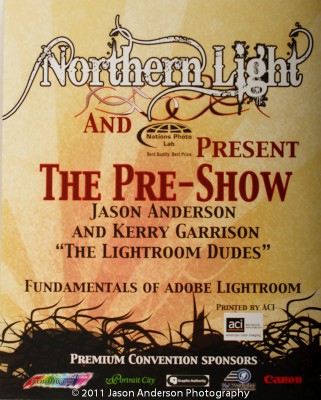
Over the weekend I had the distinct pleasure of joining my colleague and good friend Kerry Garrison (who you probably know from Camera Dojo) out “in the wild” as we traveled to the Breezy Point Resort north of Brainerd MN (about three hours west and north if the twin cities) and spoke at their Northern Lights conference. Through the coordination of our sponsor, Nations Photo Lab, and the conference hosts, MNNPA, we had a wonderful time. Not only did the coordinators treat us like Rock Stars (we did give some autographs though), the attendees were quite engaging too.
The pre-conference sessions were set to start at 12, and our gig started at 5. After a few of the logistical things were addressed that always come up with hosting conferences (they even had a live wedding going on one room next to us – what a great opportunity for a bride to get a wide range of photographers applying their trade), we got rolling. A mere five minutes into our introduction, we paused to add even more tables and chairs to the room as more and more people started filing in. For a regional conference to have a crowd this big during a pre-conference tech talk was quite surprising, but also very enjoyable. So, what did we talk about?
The topic was none other than Lightroom 3! We talked about how to navigate around, some of the benefits and tips and tricks of LR to soon realize that we are very fortunate to be in the position that we are. It was humbling to realize that we really are on the cutting edge as so many people are using Lightroom 1, LR 2, or even earlier generations of Photoshop for their workflow. Our discussion quickly was adapted to both demonstrate why and answer questions on what makes Lightroom 3 such a useful tool for both established and emerging photographers.
The questions raised were just wonderful ranging from very broad-ranging ones like “Why should wedding and portrait photographers care about upgrading their work flow?” to ones as detailed as “Can Lightroom manage PSD files?” and “How can I keyword photos during import?” By the time our two hour segment was up we had barely covered the import process, a little bit on the adjustment brush, and the nuts and bolts of things like cropping, selective color, and black and white conversions.
Ours was the last segment for the day and we were then invited to the after party over in one of the adjoining houses. Food snacks, drinks and such were all available and in abundance. With the abundance of spirits, everyone was in great spirits themselves as we laughed and talked further with lots of people about photography stuff until the wee hours of the morning. By 1am we were done though and needed to head back to our respective cities (myself to Denver and Kerry to Anaheim, CA). So, during our road trip back to Minneapolis for the return flight, we decided to record this show for you. Answers to all the questions above and more are here, as well as a few photo opp stops! Thanks for taking the time to listen, hope you enjoy it and we’ll be back again soon with more photo goodness!
Catch up with Kerry:
Follow me on:
Learn more about the Northern Lights Conference and MNPPA here:
[display_podcast]